
Overview
CrewAI provides a powerful event system that allows you to listen for and react to various events that occur during the execution of your Crew. This feature enables you to build custom integrations, monitoring solutions, logging systems, or any other functionality that needs to be triggered based on CrewAI’s internal events.How It Works
CrewAI uses an event bus architecture to emit events throughout the execution lifecycle. The event system is built on the following components:- CrewAIEventsBus: A singleton event bus that manages event registration and emission
- BaseEvent: Base class for all events in the system
- BaseEventListener: Abstract base class for creating custom event listeners
CrewAI AMP provides a built-in Prompt Tracing feature that leverages the event system to track, store, and visualize all prompts, completions, and associated metadata. This provides powerful debugging capabilities and transparency into your agent operations.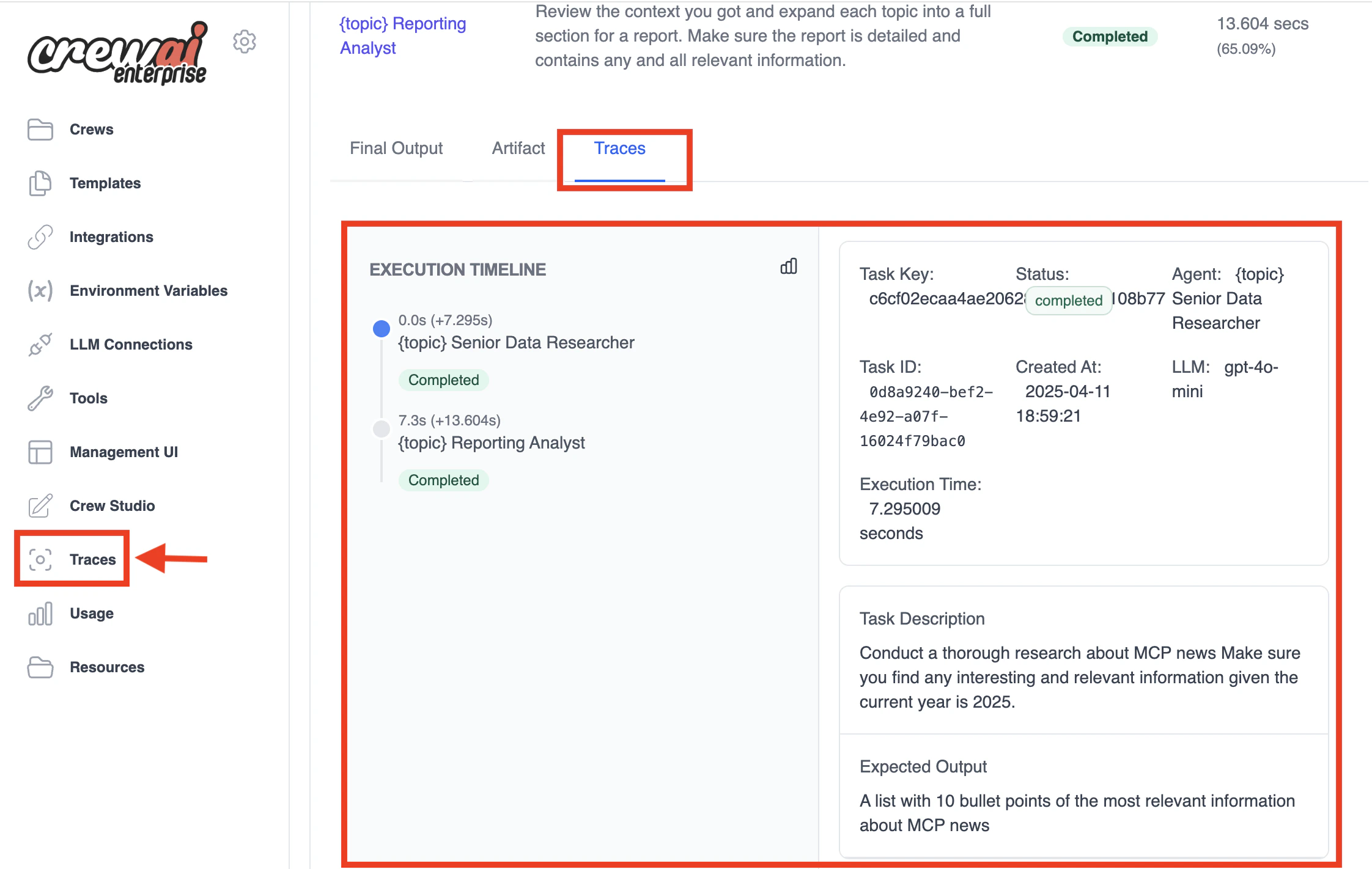
- View the complete history of all prompts sent to your LLM
- Track token usage and costs
- Debug agent reasoning failures
- Share prompt sequences with your team
- Compare different prompt strategies
- Export traces for compliance and auditing
Creating a Custom Event Listener
To create a custom event listener, you need to:- Create a class that inherits from
BaseEventListener - Implement the
setup_listenersmethod - Register handlers for the events you’re interested in
- Create an instance of your listener in the appropriate file
Properly Registering Your Listener
Simply defining your listener class isn’t enough. You need to create an instance of it and ensure it’s imported in your application. This ensures that:- The event handlers are registered with the event bus
- The listener instance remains in memory (not garbage collected)
- The listener is active when events are emitted
Option 1: Import and Instantiate in Your Crew or Flow Implementation
The most important thing is to create an instance of your listener in the file where your Crew or Flow is defined and executed:For Crew-based Applications
Create and import your listener at the top of your Crew implementation file:For Flow-based Applications
Create and import your listener at the top of your Flow implementation file:Option 2: Create a Package for Your Listeners
For a more structured approach, especially if you have multiple listeners:- Create a package for your listeners:
- In
my_custom_listener.py, define your listener class and create an instance:
- In
__init__.py, import the listener instances to ensure they’re loaded:
- Import your listeners package in your Crew or Flow file:
Available Event Types
CrewAI provides a wide range of events that you can listen for:Crew Events
- CrewKickoffStartedEvent: Emitted when a Crew starts execution
- CrewKickoffCompletedEvent: Emitted when a Crew completes execution
- CrewKickoffFailedEvent: Emitted when a Crew fails to complete execution
- CrewTestStartedEvent: Emitted when a Crew starts testing
- CrewTestCompletedEvent: Emitted when a Crew completes testing
- CrewTestFailedEvent: Emitted when a Crew fails to complete testing
- CrewTrainStartedEvent: Emitted when a Crew starts training
- CrewTrainCompletedEvent: Emitted when a Crew completes training
- CrewTrainFailedEvent: Emitted when a Crew fails to complete training
- CrewTestResultEvent: Emitted when a Crew test result is available. Contains the quality score, execution duration, and model used.
Agent Events
- AgentExecutionStartedEvent: Emitted when an Agent starts executing a task
- AgentExecutionCompletedEvent: Emitted when an Agent completes executing a task
- AgentExecutionErrorEvent: Emitted when an Agent encounters an error during execution
- LiteAgentExecutionStartedEvent: Emitted when a LiteAgent starts executing. Contains the agent info, tools, and messages.
- LiteAgentExecutionCompletedEvent: Emitted when a LiteAgent completes execution. Contains the agent info and output.
- LiteAgentExecutionErrorEvent: Emitted when a LiteAgent encounters an error during execution. Contains the agent info and error message.
- AgentEvaluationStartedEvent: Emitted when an agent evaluation starts. Contains the agent ID, agent role, optional task ID, and iteration number.
- AgentEvaluationCompletedEvent: Emitted when an agent evaluation completes. Contains the agent ID, agent role, optional task ID, iteration number, metric category, and score.
- AgentEvaluationFailedEvent: Emitted when an agent evaluation fails. Contains the agent ID, agent role, optional task ID, iteration number, and error message.
Task Events
- TaskStartedEvent: Emitted when a Task starts execution
- TaskCompletedEvent: Emitted when a Task completes execution
- TaskFailedEvent: Emitted when a Task fails to complete execution
- TaskEvaluationEvent: Emitted when a Task is evaluated
Tool Usage Events
- ToolUsageStartedEvent: Emitted when a tool execution is started
- ToolUsageFinishedEvent: Emitted when a tool execution is completed
- ToolUsageErrorEvent: Emitted when a tool execution encounters an error
- ToolValidateInputErrorEvent: Emitted when a tool input validation encounters an error
- ToolExecutionErrorEvent: Emitted when a tool execution encounters an error
- ToolSelectionErrorEvent: Emitted when there’s an error selecting a tool
MCP Events
- MCPConnectionStartedEvent: Emitted when starting to connect to an MCP server. Contains the server name, URL, transport type, connection timeout, and whether it’s a reconnection attempt.
- MCPConnectionCompletedEvent: Emitted when successfully connected to an MCP server. Contains the server name, connection duration in milliseconds, and whether it was a reconnection.
- MCPConnectionFailedEvent: Emitted when connection to an MCP server fails. Contains the server name, error message, and error type (
timeout,authentication,network, etc.). - MCPToolExecutionStartedEvent: Emitted when starting to execute an MCP tool. Contains the server name, tool name, and tool arguments.
- MCPToolExecutionCompletedEvent: Emitted when MCP tool execution completes successfully. Contains the server name, tool name, result, and execution duration in milliseconds.
- MCPToolExecutionFailedEvent: Emitted when MCP tool execution fails. Contains the server name, tool name, error message, and error type (
timeout,validation,server_error, etc.). - MCPConfigFetchFailedEvent: Emitted when fetching an MCP server configuration fails (e.g., the MCP is not connected in your account, API error, or connection failure after config was fetched). Contains the slug, error message, and error type (
not_connected,api_error,connection_failed).
Knowledge Events
- KnowledgeRetrievalStartedEvent: Emitted when a knowledge retrieval is started
- KnowledgeRetrievalCompletedEvent: Emitted when a knowledge retrieval is completed
- KnowledgeQueryStartedEvent: Emitted when a knowledge query is started
- KnowledgeQueryCompletedEvent: Emitted when a knowledge query is completed
- KnowledgeQueryFailedEvent: Emitted when a knowledge query fails
- KnowledgeSearchQueryFailedEvent: Emitted when a knowledge search query fails
LLM Guardrail Events
- LLMGuardrailStartedEvent: Emitted when a guardrail validation starts. Contains details about the guardrail being applied and retry count.
- LLMGuardrailCompletedEvent: Emitted when a guardrail validation completes. Contains details about validation success/failure, results, and error messages if any.
- LLMGuardrailFailedEvent: Emitted when a guardrail validation fails. Contains the error message and retry count.
Flow Events
- FlowCreatedEvent: Emitted when a Flow is created
- FlowStartedEvent: Emitted when a Flow starts execution
- FlowFinishedEvent: Emitted when a Flow completes execution
- FlowPausedEvent: Emitted when a Flow is paused waiting for human feedback. Contains the flow name, flow ID, method name, current state, message shown when requesting feedback, and optional list of possible outcomes for routing.
- FlowPlotEvent: Emitted when a Flow is plotted
- MethodExecutionStartedEvent: Emitted when a Flow method starts execution
- MethodExecutionFinishedEvent: Emitted when a Flow method completes execution
- MethodExecutionFailedEvent: Emitted when a Flow method fails to complete execution
- MethodExecutionPausedEvent: Emitted when a Flow method is paused waiting for human feedback. Contains the flow name, method name, current state, flow ID, message shown when requesting feedback, and optional list of possible outcomes for routing.
Human In The Loop Events
- FlowInputRequestedEvent: Emitted when a Flow requests user input via
Flow.ask(). Contains the flow name, method name, the question or prompt being shown to the user, and optional metadata (e.g., user ID, channel, session context). - FlowInputReceivedEvent: Emitted when user input is received after
Flow.ask(). Contains the flow name, method name, the original question, the user’s response (orNoneif timed out), optional request metadata, and optional response metadata from the provider (e.g., who responded, thread ID, timestamps). - HumanFeedbackRequestedEvent: Emitted when a
@human_feedbackdecorated method requires input from a human reviewer. Contains the flow name, method name, the method output shown to the human for review, the message displayed when requesting feedback, and optional list of possible outcomes for routing. - HumanFeedbackReceivedEvent: Emitted when a human provides feedback in response to a
@human_feedbackdecorated method. Contains the flow name, method name, the raw text feedback provided by the human, and the collapsed outcome string (if emit was specified).
LLM Events
- LLMCallStartedEvent: Emitted when an LLM call starts
- LLMCallCompletedEvent: Emitted when an LLM call completes
- LLMCallFailedEvent: Emitted when an LLM call fails
- LLMStreamChunkEvent: Emitted for each chunk received during streaming LLM responses
- LLMThinkingChunkEvent: Emitted when a thinking/reasoning chunk is received from a thinking model. Contains the chunk text and optional response ID.
Memory Events
- MemoryQueryStartedEvent: Emitted when a memory query is started. Contains the query, limit, and optional score threshold.
- MemoryQueryCompletedEvent: Emitted when a memory query is completed successfully. Contains the query, results, limit, score threshold, and query execution time.
- MemoryQueryFailedEvent: Emitted when a memory query fails. Contains the query, limit, score threshold, and error message.
- MemorySaveStartedEvent: Emitted when a memory save operation is started. Contains the value to be saved, metadata, and optional agent role.
- MemorySaveCompletedEvent: Emitted when a memory save operation is completed successfully. Contains the saved value, metadata, agent role, and save execution time.
- MemorySaveFailedEvent: Emitted when a memory save operation fails. Contains the value, metadata, agent role, and error message.
- MemoryRetrievalStartedEvent: Emitted when memory retrieval for a task prompt starts. Contains the optional task ID.
- MemoryRetrievalCompletedEvent: Emitted when memory retrieval for a task prompt completes successfully. Contains the task ID, memory content, and retrieval execution time.
- MemoryRetrievalFailedEvent: Emitted when memory retrieval for a task prompt fails. Contains the optional task ID and error message.
Reasoning Events
- AgentReasoningStartedEvent: Emitted when an agent starts reasoning about a task. Contains the agent role, task ID, and attempt number.
- AgentReasoningCompletedEvent: Emitted when an agent finishes its reasoning process. Contains the agent role, task ID, the plan produced, and whether the agent is ready to proceed.
- AgentReasoningFailedEvent: Emitted when the reasoning process fails. Contains the agent role, task ID, and error message.
Observation Events
- StepObservationStartedEvent: Emitted when the Planner begins observing a step’s result. Fires after every step execution, before the observation LLM call. Contains the agent role, step number, and step description.
- StepObservationCompletedEvent: Emitted when the Planner finishes observing a step’s result. Contains whether the step completed successfully, key information learned, whether the remaining plan is still valid, whether a full replan is needed, and suggested refinements.
- StepObservationFailedEvent: Emitted when the observation LLM call itself fails. The system defaults to continuing the plan. Contains the error message.
- PlanRefinementEvent: Emitted when the Planner refines upcoming step descriptions without a full replan. Contains the number of refined steps and the refinements applied.
- PlanReplanTriggeredEvent: Emitted when the Planner triggers a full replan because the remaining plan was deemed fundamentally wrong. Contains the replan reason, replan count, and number of completed steps preserved.
- GoalAchievedEarlyEvent: Emitted when the Planner detects the goal was achieved early and remaining steps will be skipped. Contains the number of steps remaining and steps completed.
A2A (Agent-to-Agent) Events
Delegation Events
- A2ADelegationStartedEvent: Emitted when A2A delegation starts. Contains the endpoint URL, task description, agent ID, context ID, whether it’s multiturn, turn number, agent card metadata, protocol version, provider info, and optional skill ID.
- A2ADelegationCompletedEvent: Emitted when A2A delegation completes. Contains the completion status (
completed,input_required,failed, etc.), result, error message, context ID, and agent card metadata. - A2AParallelDelegationStartedEvent: Emitted when parallel delegation to multiple A2A agents begins. Contains the list of endpoints and the task description.
- A2AParallelDelegationCompletedEvent: Emitted when parallel delegation to multiple A2A agents completes. Contains the list of endpoints, success count, failure count, and results summary.
Conversation Events
- A2AConversationStartedEvent: Emitted once at the beginning of a multiturn A2A conversation, before the first message exchange. Contains the agent ID, endpoint, context ID, agent card metadata, protocol version, and provider info.
- A2AMessageSentEvent: Emitted when a message is sent to the A2A agent. Contains the message content, turn number, context ID, message ID, and whether it’s multiturn.
- A2AResponseReceivedEvent: Emitted when a response is received from the A2A agent. Contains the response content, turn number, context ID, message ID, status, and whether it’s the final response.
- A2AConversationCompletedEvent: Emitted once at the end of a multiturn A2A conversation. Contains the final status (
completedorfailed), final result, error message, context ID, and total number of turns.
Streaming Events
- A2AStreamingStartedEvent: Emitted when streaming mode begins for A2A delegation. Contains the task ID, context ID, endpoint, turn number, and whether it’s multiturn.
- A2AStreamingChunkEvent: Emitted when a streaming chunk is received. Contains the chunk text, chunk index, whether it’s the final chunk, task ID, context ID, and turn number.
Polling & Push Notification Events
- A2APollingStartedEvent: Emitted when polling mode begins for A2A delegation. Contains the task ID, context ID, polling interval in seconds, and endpoint.
- A2APollingStatusEvent: Emitted on each polling iteration. Contains the task ID, context ID, current task state, elapsed seconds, and poll count.
- A2APushNotificationRegisteredEvent: Emitted when a push notification callback is registered. Contains the task ID, context ID, callback URL, and endpoint.
- A2APushNotificationReceivedEvent: Emitted when a push notification is received from the remote A2A agent. Contains the task ID, context ID, and current state.
- A2APushNotificationSentEvent: Emitted when a push notification is sent to a callback URL. Contains the task ID, context ID, callback URL, state, whether delivery succeeded, and optional error message.
- A2APushNotificationTimeoutEvent: Emitted when push notification wait times out. Contains the task ID, context ID, and timeout duration in seconds.
Connection & Authentication Events
- A2AAgentCardFetchedEvent: Emitted when an agent card is successfully fetched. Contains the endpoint, agent name, agent card metadata, protocol version, provider info, whether it was cached, and fetch time in milliseconds.
- A2AAuthenticationFailedEvent: Emitted when authentication to an A2A agent fails. Contains the endpoint, auth type attempted (e.g.,
bearer,oauth2,api_key), error message, and HTTP status code. - A2AConnectionErrorEvent: Emitted when a connection error occurs during A2A communication. Contains the endpoint, error message, error type (e.g.,
timeout,connection_refused,dns_error), HTTP status code, and the operation being attempted. - A2ATransportNegotiatedEvent: Emitted when transport protocol is negotiated with an A2A agent. Contains the negotiated transport, negotiated URL, selection source (
client_preferred,server_preferred,fallback), and client/server supported transports. - A2AContentTypeNegotiatedEvent: Emitted when content types are negotiated with an A2A agent. Contains the client/server input/output modes, negotiated input/output modes, and whether negotiation succeeded.
Artifact Events
- A2AArtifactReceivedEvent: Emitted when an artifact is received from a remote A2A agent. Contains the task ID, artifact ID, artifact name, description, MIME type, size in bytes, and whether content should be appended.
Server Task Events
- A2AServerTaskStartedEvent: Emitted when an A2A server task execution starts. Contains the task ID and context ID.
- A2AServerTaskCompletedEvent: Emitted when an A2A server task execution completes. Contains the task ID, context ID, and result.
- A2AServerTaskCanceledEvent: Emitted when an A2A server task execution is canceled. Contains the task ID and context ID.
- A2AServerTaskFailedEvent: Emitted when an A2A server task execution fails. Contains the task ID, context ID, and error message.
Context Lifecycle Events
- A2AContextCreatedEvent: Emitted when an A2A context is created. Contexts group related tasks in a conversation or workflow. Contains the context ID and creation timestamp.
- A2AContextExpiredEvent: Emitted when an A2A context expires due to TTL. Contains the context ID, creation timestamp, age in seconds, and task count.
- A2AContextIdleEvent: Emitted when an A2A context becomes idle (no activity for the configured threshold). Contains the context ID, idle time in seconds, and task count.
- A2AContextCompletedEvent: Emitted when all tasks in an A2A context complete. Contains the context ID, total tasks, and duration in seconds.
- A2AContextPrunedEvent: Emitted when an A2A context is pruned (deleted). Contains the context ID, task count, and age in seconds.
Event Handler Structure
Each event handler receives two parameters:- source: The object that emitted the event
- event: The event instance, containing event-specific data
BaseEvent and include:
- timestamp: The time when the event was emitted
- type: A string identifier for the event type
CrewKickoffCompletedEvent includes crew_name and output fields.
Advanced Usage: Scoped Handlers
For temporary event handling (useful for testing or specific operations), you can use thescoped_handlers context manager:
Use Cases
Event listeners can be used for a variety of purposes:- Logging and Monitoring: Track the execution of your Crew and log important events
- Analytics: Collect data about your Crew’s performance and behavior
- Debugging: Set up temporary listeners to debug specific issues
- Integration: Connect CrewAI with external systems like monitoring platforms, databases, or notification services
- Custom Behavior: Trigger custom actions based on specific events
Best Practices
- Keep Handlers Light: Event handlers should be lightweight and avoid blocking operations
- Error Handling: Include proper error handling in your event handlers to prevent exceptions from affecting the main execution
- Cleanup: If your listener allocates resources, ensure they’re properly cleaned up
- Selective Listening: Only listen for events you actually need to handle
- Testing: Test your event listeners in isolation to ensure they behave as expected